Native screenshot
Freeze the desktop, annotate in place, and export to the clipboard or a file—entirely on your Mac.
A toolkit designed to grow
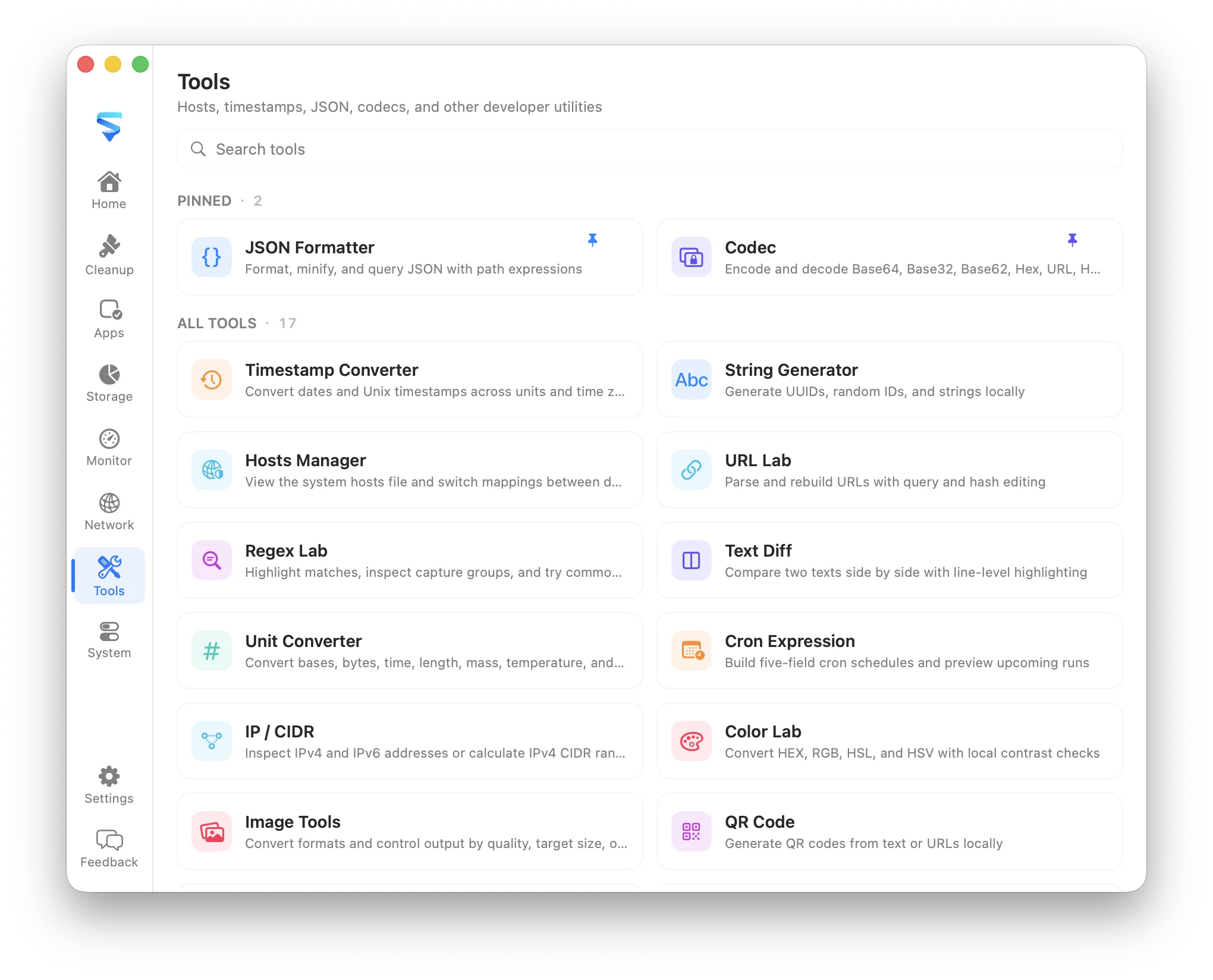
MachKit brings 20 focused Mac tools into one native, searchable catalog for text, data, images, networking, security, diagnostics, and everyday tasks. Alongside that catalog, a native screenshot workflow lets you capture any region from a global shortcut, annotate with shapes, arrows, highlight, mosaic, and text, then copy or save—without another window or cloud upload. Each tool shares the same shell, language, theme, shortcuts, and privacy model.
Freeze the desktop, annotate in place, and export to the clipboard or a file—entirely on your Mac.
Each utility starts with a real recurring task instead of a broad feature checklist.
Tools share search, global shortcuts, appearance, localization, clipboard feedback, and local storage.
A toolkit designed to grow
Browse the full catalog by category. Each utility includes a short summary, a fuller introduction, and the concrete jobs it is meant to cover.
Convert Unix timestamps and standard date formats across units, time zones, and common interchange formats.
Timestamp Converter turns Unix epochs, ISO strings, and everyday date formats into each other without leaving the Mac. Switch units and time zones, copy the result you need, and keep debugging logs or API payloads free of mental math and timezone mistakes.
Format, minify, sort keys, inspect structure, and query JSON with path expressions.
JSON Formatter is a local workspace for messy payloads. Beautify or minify JSON, sort keys for comparison, inspect structure at a glance, and query values with path expressions—useful when an API response or config file needs to be readable without uploading it anywhere.
Encode and decode BaseXX, Unicode, UTF-8, URL, ASCII/Native, HTML, Punycode, GBK, Data URI, radix, and related formats locally.
Codec covers everyday encoding and escaping chores. Transform Base16–85, Unicode, UTF-8 bytes, URL, ASCII/Native, HTML, Punycode, GBK, Quoted-Printable, Data URIs, integer radix conversion, and more—or hash text—without an online converter.
Encrypt and decrypt with AES, ChaCha, RSA, DES/3DES, and SM2/SM4 entirely on your Mac.
Cipher keeps cryptography local. Use AES and ChaCha modes, RSA, DES/3DES, and SM2/SM4—without uploading secrets to a website.
Generate UUID v1–v7, ULIDs, Nano IDs, Object IDs, hex strings, and configurable random strings locally.
String Generator creates identifiers and random strings on the Mac instead of in a browser tab. Choose UUID versions, ULID, Nano ID, Object ID, hex strings, or configurable random strings when scaffolding data, filling forms, or preparing test fixtures.
Test expressions, highlight matches, inspect capture groups, and try common replacements.
Regex Lab makes pattern testing immediate and visual. Paste sample text, refine an expression, highlight matches, inspect capture groups, and try replacements before the pattern ever lands in production code or a search-and-replace workflow.
Compare two texts side by side, ignore whitespace when needed, and copy a line-level patch.
Text Diff compares two snippets side by side so changes are easy to spot. Ignore whitespace when the noise gets in the way, review line-level differences, and copy a patch-style result for notes, reviews, or hand-offs.
Parse and rebuild URLs while editing query parameters, paths, and fragments.
URL Lab breaks a URL into editable parts and rebuilds it cleanly. Adjust query parameters, paths, and fragments without fighting escaped strings by hand—handy for API debugging, campaign links, and deep-link construction.
Convert integers across bases and translate common byte, time, length, mass, and temperature units.
Unit Converter handles the unit math that appears in logs, specs, and everyday calculations. Switch integer bases, convert byte sizes, and move between common time, length, mass, and temperature units without reaching for a separate calculator.
Inspect the current hosts file and switch shared or environment-specific mappings with explicit write permission.
Hosts Manager keeps environment-specific hostname mappings visible in one place. Review the active hosts file, compare shared profiles, and apply a switch only after macOS grants write permission—so local development and staging setups stay intentional instead of buried in Terminal edits.
Inspect IPv4 and IPv6 addresses or calculate IPv4 CIDR ranges.
IP / CIDR explains a single IPv4 or IPv6 address and calculates IPv4 network ranges in one place. Identify address kinds, integer and reverse DNS forms, or inspect masks, ranges, and membership when reviewing logs, firewall rules, and network plans.
Decode, inspect, validate, and create JSON Web Tokens locally.
JWT Lab keeps token work on the Mac. Decode headers and payloads, inspect claims, validate structure, and create tokens locally when debugging auth flows—without pasting secrets into an unknown website.
Inspect PEM certificates, validity, fingerprints, and SANs without uploading them.
Certificate Lab inspects PEM certificate details, validity periods, fingerprints, and subject alternative names on the Mac. Use it when reviewing a certificate before installation or checking what it identifies—without uploading private material.
Build, parse, edit, and run HTTP requests visually, then convert to or from cURL.
cURL Lab turns HTTP request work into a readable workspace. Build or paste a request, edit headers and body visually, convert to or from cURL, and run it when you need a quick local check—without reconstructing long command lines by hand.
Scan any TCP port or range with live progress and open-port results.
Port Scanner checks TCP ports or ranges with live progress and a clear open-port list. Use it to verify local services, confirm a listener after deploy, or quickly see what is accepting connections on a host you manage.
Convert HEX, RGB, HSL, and HSV colors and check contrast locally.
Color Lab converts between HEX, RGB, HSL, and HSV while keeping contrast checks nearby. Use it when adjusting themes, validating accessibility contrast, or translating a color across design and code formats.
Convert image formats and control output by quality, size, or dimensions.
Image Tools handles common local image prep without an upload service. Convert formats and control output by quality, target size, or dimensions when you need a smaller asset, a different container, or a quick resize before sharing.
Generate customizable QR codes from text or URLs entirely locally.
QR Code turns text or URLs into a customizable code without sending the content to a generator website. Keep Wi-Fi notes, deep links, and temporary sharing payloads local while you adjust size and appearance.
Build five-field cron schedules and preview upcoming run times.
Cron Expression helps you write a five-field schedule and immediately see when it would run next. Use it to validate jobs, explain schedules to teammates, or catch off-by-one mistakes before a timer is deployed.
Convert Unix permission modes and preview symbolic permission changes.
chmod Lab translates between octal, symbolic, and permission-bit views of Unix modes. Preview what a change would mean before applying it, which is useful when scripts, shared folders, or SSH keys need the right access without guesswork.
What it covers
MachKit’s screenshot tool is built for the moment you need to explain something on screen. Trigger it from a global shortcut, drag a region, mark it up with rectangles, ellipses, arrows, pen, highlight, mosaic, or text, then copy or save. The capture stays local and does not require opening the main window.
The catalog is not limited to programming syntax. It includes focused utilities that remove repetitive steps from writing, content handling, data preparation, networking, troubleshooting, and daily Mac use.
Open the full tool list, search by name or keyword, or assign a global keyboard shortcut to a frequently used utility. Inputs remain local and tools do not require an account.
FAQ
No. Bundled tools such as Codec, Cipher, and JSON Formatter run locally inside the Mac app. They do not require an account or send tool input to a cloud converter.
Yes. Assign an optional global shortcut per utility so Codec, Cipher, or another tool opens without searching the full catalog first.
Yes. MachKit is free to download from GitHub Releases and the source is published under the MIT license.